Monday, 30 May 2011

Maya Tasks Final Weeks - End of Year 2

Here are the last of all Maya tasks for this year.

Dynamics - Week 2

Softbody - Flesh

In this example the skin around the chin has been made a softbody. A softbody controls mesh with a particle for every vertex. The particles around the chin have been weighted so that they are attracted to a copy of the original mesh shape. By making it, for example, half weighted, the flesh around the chin wobbles. We have control over a few other attributes to fine tune the effect.

Softbody - Cloth

The cloth has been made a softbody. The ball collides with a dummy plane just underneath the cloth plane. the particles in the cloth collide with the ball. The particles conserve is set to zero to leave an imprint.

Softblody - Snow

The snow plane has been made soft. This is similar to the last example. The particles have been made to collide with the shoe. With the conserve attribute set to zero, the particles stop moving after the release of the shoe.

Softbody - Water

Here a water plane has been made a softbody. This has been made to ripple like water with the use of springs make the motion of the ripple travel.

Softbody - Bubbles

Here the bubbles are begin deformed by their own individual lattice deformers. The lattice deformers are softbodies that are being affected by dynamic fields.

Here is a video showing the above effects.


Dynamics - Week 3 to 4

For The last two weeks we looked at the nDynamics System in Maya. nDynamics divides into two parts. nCloth - for cloth simulations. nParticles - for advanced particle simulations. The beauty of this system is that the particles and cloth work together, so particles can have an effect of the cloth as much as the cloth can have an effect on the particles. The particle system is even more advanced than the standard particle system in Maya, as it has additional features.

The first task was a introduction to cloth with a pretty standard set of flags blowing in the wind.
The flags were made cloth objects and the wind atributes in the system node (nucleus) were set accordingly.


The second example show how we can cache two simulations and blend between the two. In the first cache the bouncy castle was set to be deflated. Then in the second, to be fully inflated.


This example shows how a simple piece of cloth can be used to influence a more complicated piece of mesh. The netting (made up of cylinders with lots of polygons) is influenced (by wrap deformer) to a flat piece of cloth (hidden). Some nParticles were added into the scene for the netting to collide with.


This next example was particularly complicated. A combination of techniques was used here to achieve a dynamic rope bridge. two plat planes were used (one above the other) representing the lower and upper ropes. The ropes and planks are influenced by the cloth planes. The vertical ropes are constrained by both ends of the horizontal ropes. The cloth planes are held at both ends by transform constraints.


Here is a video of the above effects.

Yeah, I went a little further and experimented at destroying the rope bridge. It worked surprisingly well.


Now for the last three examples.
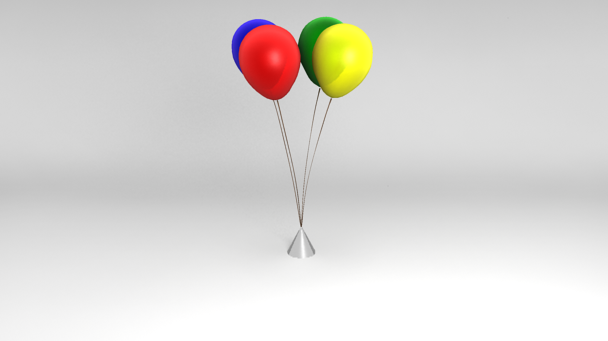
The first demonstrates how you can use cloth to simulate other objects such as balloons. The string has its own settings as does the balloons. They are constrained together at the join with a component to component constraint.


This example demonstrates a very powerful aspect of the cloth simulation. You can make tear-able surfaces. We can control the exact time in which the cloth tears by animating the glue strength on the cloth.


A similar thing can been seen here as the bag splits apart. nParticles have been filled inside the bag and have an M&M instanced to it.


Here is a video of the above effects.


Match Moving - Week 2 to 4

Week 2 Automatic tracking

This example shows what automatic tracking can achieve. The spheres are added in to test how they match in the shot.


The software detects where the camera is moving and reconstructs it by following points of high contrast (in theory). The downside to this is that it can't distinguish between static objects and moving objects so anything that moves has to be masked out to avoid the software getting confused.

Target Tracking

In this example I have manually picked the points for the software to track. I've picked several points from varying distances to the camera so that the software has enough information to calculate the approximate perspective and movement.


Masked auto Track

This example shows how masking the tracking area can localise the automatic tracking calculations. This has been done in reverse so instead of the tracker calculating the camera movement, it is tracking the movement of the car.


And so this car has now been turned into a wind up toy car!


High Res Body Modeling - everything for this year

The head


The Body


So next year we will be finishing it, with the feet, arms and hands. There may be one or two areas that need a little clean up or more detail, but it's at a good stage so far.

For any previous tasks view the Maya Tutorials link to the left of the page.

A Flock of Pixels

Sunday, 29 May 2011

Work Experience - Butch Auntie Profile


I've been working for Butch Auntie for work experience. They provide visuals including projections for live events such as parties and festivals.
They are usually provided with a themed by their clients and for that reason have over many years created a vast range of professional visuals.

The company was founded by Butch Auntie's Directors Steve Brown and Pete Wallace. Before this they both worked on major feature films and TV commercials.
Prior to Butch Auntie, Steve has had experience in traditional stop-motion and 2D animation. They express that both their quality and skill shown in their work has achieved them a status 'above the average VJ outfit'.

You can visit their site at
www.butchauntie.com
for examples of what they have worked on.

Like I said yesterday, I did email some questions to Pete too, as there was little else on the site, but I can guess that he is very busy at the moment.

The questions I asked were:

when / how was Butch Auntie first formed?
how many people do you employ at any one time? are they all freelance?
What did you and Steve Brown do before forming Butch Auntie?
What is the difference between Butch Auntie and Microchunk?
Is there a story to where the name Butch Auntie came from?
Whats the future for Butch Auntie?

If and when I have some answers I'll of course update the post.

A Flock of Pixels

Saturday, 28 May 2011

Work Experience - Evaluation

For my work placement I worked for Butch Auntie. While doing work for them I have had to take on new skills and approach projects with a different attitude, because for the first time, I'm not working on one of my own projects, I 'm working for someone else who has the task of providing content for other clients.
With that comes the need to communicate regularly, and as a result my email inbox has never been so full until now.

The work I have been producing I've not always been so happy with, but that's not to say the times been wasted. As I gradually discovered, it is usually almost impossible to create something right first time, let alone for someone else. We usually started with briefs that were very general at first, and from providing something within a day or two, we could then get feedback on what they like and dislike. This way of working was something that took a little getting used to.

I have been so used to taking the first week of any given assignment slowly, just getting ideas together and figuring out what I want from my own projects, that at the beginning of work experience I was quite panicky. Luckily this soon went away as I got into the swing of things. I think that was an important experience to take from this.

I have to say though, that most of the other difficulties encountered were mostly technical. I found myself making silly errors, which are usually only made when under pressure. Like in the last week of a project deadline. I think because of the way I have had to work to get things done I have been more prone to making mistakes. As a result I didn't always complete the project deadline in its entirety. I wasn't particularly happy with myself for this, but I guess I can learn from my mistakes.

I have been happy with most of the work I have produced, and I have learnt a great deal more on particle dynamics in Maya along the way. I think though the project I enjoyed the most has to have been the Jazz themed visual. I am particularly happy with what I produced considering I didn't use Maya and found it the least stressful project.

I am glad to have had this opportunity to experience work in the last 5 weeks of year two. I think I would have found doing another five week project a step backwards, so I think now I am ready to move forward into year three.

A Flock of Pixels

PS - Company history and profile is slightly delayed as I asked some questions directly to Pete to accompany the rest of the text, but haven't gotten a reply. I don't expect I'll get one now as I can assume he is very busy, so I will probably just post what I have some time tomorrow.

Monday, 23 May 2011

Work Experience - The Final Week

It's been a busy few weeks. We've been working on two projects at the same time. Swapping between the two every few days it seems. Although for both I have been using particle effects, which have proven to be a right pain. All my particle disk caches have been over 50 gigabytes and is not very handy when backing up files. I have had to keep excluding them from the backups. That, and separating things in render layers and composting in AE, has become ever so confusing.

Anyway, one of the projects is a company re branding party in the form of a projection in a church. Lots of particle and geometry effects needed for this. I should be able to blog this soon, but if not I'm sure you can wait until this Thursday when I present my work at the crit and talk about my experiences.

The other project is to create some visuals (in my case, particle based visuals) for another company. Again this is all going to be shown at the crit. But just to give a little detail without showing anything, the task is creating some musicy visuals with particles, emitting and or morphing etc. This has proven to be the most complicated and frustrating stuff I've worked on over work experience. It's all fun until things start playing up, or renders fail. Ok, I'm blaming my tools again! I guess it's all part of the learning experience, some things just work first time while other things constantly fail.

At some point this week I will be sending an email to Pete with some questions about Butch Auntie and forming a post about the company I've been working for.

A Flock of Pixels.

Monday, 9 May 2011

Work Experience - Begin Week Three

I've got something to post on work experience!
Before that, lets recap. I've done two weeks official work experience, plus whatever was done in the holidays. So far I've worked on two projects, however the first one I haven't blogged yet as I'm waiting for the go-ahead, so the second project is what I'm posting now.

So last Friday was the day of one of the events that I was making visuals for.
In this case it was a posh party with the theme of 1920s - 1930s New York Jazz / Cotton Club.

A blank J shaped wall in this venue was to have visuals projected onto it.

No music was involved in the making of the visuals as it was meant to be a kind of lighting and decor. Nothing too distracting. ie, no timing to fast beats etc.

So to answer the brief I created this visual, a minute in length, and loops.

Jazz City 01 from A Flock of Pixels on Vimeo.


The whole thing was done without Maya or any kind of 3D effects. A mixture of edited photos and other images were used within After Effects to create the shadows / silhouettes that cast over the cityscape at night. For those that look closely, you might find a few duplicate buildings, but knowing that it was going to be spread across three walls and only looked at every so often, I think I was able to get away with it!


Making of:

Before I started this I did some visual research on the themes.


This was a mock-up I did in Photoshop before I went ahead with the final video.


I did start constructing this in Maya, but came across a rather large problem with both the Maya Software and Mental Ray Renderer in Maya, and that is that they can't render shadows (depth map or raytraced) cast by flat planes correctly. Weird!
Basically I created a wall, then positioned a small card with the silhouette cut out just in front (exactly parallel), then created a spot light and aimed it from one side. I expected it to cast a distorted silhouette shadow, but alas, the shadow was undistorted although appearing larger. Thinking, "is this how the real world reacts?", I did a test with a real torch and a card and the shadow was indeed distorted on the wall (a bit pedantic but I had to make sure!). So there we have it. I was amazed that I couldn't find anything on this on the internet. Whether other 3D software or different renderer's have this same technical inaccuracy is another question entirely.)

At this point I decided to do the whole thing in After Effects, using lots of edited images.

Lastly, here is a video of the video projection at the event.


A Flock of Pixels

Maya Tasks Week 26 - Dynamics and Match Moving

Dynamics - Rigid Bodies

To begin the next set of tutorials we are now looking at rigid body dynamics.
In this first example I've created a chain, that swings down with the force of gravity. The chain links collide with each other as solid objects to create the swinging chain. Stand-in objects of lower density of polygons were used in the simulation an higher quality chains were used for rendering.


This next example is of an earring that swings much like the chain, except that the objects are attached to each other via Pin constraints instead, because they don't collide in the same way.


The next example is of a catapult throwing a rock at a brick wall. This one was slightly more complex to setup, but was quite fun to watch in simulate.
First the ground plane was set to be a rigid object that isn't moved by dynamics. (Passive Rigid Body) Then the bricks, catapult and rock were set to be dynamic objects. (Active Rigid Body)
To propel the catapult, a spring constraint was used. Dynamics done the rest.


Lastly is the Cradle. The idea is the end metal balls are supposed to bounce off the pack. This seemed to require more luck than anything else, but basically the balls are Active Rigid Bodies and are held up by a pair of Nail constraints. It was then a matter of tweaking with the properties of the balls and gravity field to get it to work. Even then it only managed a swing or two.


Here is a video of the examples above.


Match Moving - Still Camera

This is matching a filmed shot in 3D for the purpose of adding in CG elements.
Well not exactly match moving yet as the camera is still, but this is sometimes the scenario. That also means that you can't use software to calculate the 3D space in the image so in this example the camera had to be positioned manually with trial and error.

Anyway, I had to use what is in the scene as visual cues to work out approximately the 3D space. One of the first things to work it is the focal length. This can partially be figured out but how much objects shrink into the distance. First of all the camera had to be roughly positioned, then a few cubes were added to the scene a positioned where the buildings were. From then on it was a matter of tweaking the camera position, the focal length and the models until the whole set was mapped out in 3D space.

A few spheres were added into the scene to test how things fitted in and then an orrery was put on top of the bricks in the center.
Lastly the lighting was figured out (approximately) by looking at the shadows in the scene.


Next week we look at a moving shot.


Oh and here is the progress on the high res body modelling tutorial which I started during the holidays. Not finished yet, but getting there.


A Flock of Pixels

Tuesday, 3 May 2011

Work Experience - Update

Back again, with not much to say, but I've still been working on projects.
First of all I finished and handed in my most recient essay, I've also ploughed through the rest of the Maya tutorials and am now almost up to date. (I'll blog them later)
The last project I was working on as part of work experience has finished, so I'm sure that I will soon be albe to post my stuff for that soon. Another project was also briefed during the holidays. This is going to be projection for a jazz themed party. I think that event is this friday so its a tight deadline. That also means that some time after then I should (in theory) be able to post my work on this too.

(Too much text!!! :( )

A Flock of Pixels