Went on a short break for a few days during the dull whether, but now I'm back again and the sun is shinning and I'm getting further behind with my summer project. What I didn't get round to blogging last week, I'm blogging now.
So I left the last post with a few things undecided and unknown. The undecided being, how the film is going to look and the unknown being, exactly how am I going to create a storm in the middle of an ocean. This is mostly a Maya orientated post.
I have been wondering how I am going to go about this technically. My first port of call was The amazing ocean shader in Maya and all the other bits and bobs which go with it. Although amazingly realistic and requiring no effort, it unfortunately isn't really a one button click solution. I haven't had much experience with how it works prior to this project. Most of what I'm about to say is what I've found out by myself and is not necessarily accurate. Which of course means that if anyone can correct me or give any extra technical advice, that would be great.
So, the ocean effect. By default it creates a flat plane with the ocean shader attached. The ocean shader not only shades the flat surface, it also deforms it to create the waves. I actually found a preset called stormy ocean or something similar. This also created some other effects along with the ocean effect. The one thing I did do was model a simple boat. It's very simple and only for the tests I'm about to show you.
I made the boat float on the stormy ocean using (and this is Maya technical talk) a 'boat' locator. This caused all kinds of confusion when explaining to my brother. Am I referring to the boat I made or the null object locater which just happens to be named boat? I did a quick render, just with preview settings and this is what I got.
The camera is also floating on the water and ocasionaly penitrates the surface. Not intensional.
The right side of the window shows the original render. The left side shows the result of messing around in After effects. I had said in a previous post about using my character in silhouette. I also thought about the boat being simple or simply shaded. So just to see what it looked like I applied a threshold effect on the video. Together with the rolling fog and everything else in black and white, (it is actually slightly tinted with colour from the original render) I thought it looked good.
So I went back to Maya and was thinking, great. I have an ocean… How do I create a whirlpool for the last sequence? Creating some sort of sucking, twisty effect isn't that difficult. And there are probably may ways to go about it. Whats difficult is getting it to look like the same ocean as used in any of the other shots. I wasn't going to worry about that at the moment , because at the time, I was not aware of how difficult it would be. I was more concerned about just creating a sucking, twisty effect.
I had this crazy idea of using a ring donut (torus primitive shape in Maya). When you create a primitive shape, it comes with a few attributes that can be set. Things like size, thickness, subdivisions etc. The donut also comes with a 'twist' attribute. The twist is effectively turning the donut inside out and back around. So when I animated that attribute on a loop, it created this constant sucking effect. To achieve the twisting effect, I used a twist deformer. This made it look like it was swirling around and around and sucking inwards. So the basic motion is sorted, but how do I make it look like part of the ocean? Well what you don't do is stick an ocean shader to the donut. As when I tried that, I found out that the ocean shader was effectively ignoring the motion on the donut and just deforming the geometry with its waves. The waves were just passing over the donut in a straight line.
I've called this effect and copyrighted it "The cat under the carpet effect". You've all seen it in cartoons where a cat or a mouse (possibly named Jerry) goes under a carpet, and you see the lump move about, while the design of the carpet deforms.
This is basically the same thing except in reverse. The ocean (the carpet) is being dragged along the floor while the donut (the cat or mouse) stays in the same place. No matter how much I make it twist it still looks the same. How do I fix this? Or how did I fix this?
Well, there happens to be an ocean texture as well as an ocean shader. Both nodes have the same attributes, except one is just a texture, and the other is a complete shader. So to put simply and quickly, textures use the UVs on an object. So f the Objects deforming, so are the UVs and if the UVs are deforming, so are the textures applied to it. You can probably guess where this is going now.
Now I did all these tests almost a week ago now so I don't remember the exact processes that I went through, but I'm sure it'll come flooding back to me. I have in the following test used an animated noise texture, instead of an animated ocean texture. The reason being that the ocean texture looks too much like the waves are going in one direction. Whereas the noise texture creates more general ripples.
Now this video shows a few more problems.
1) It looks more like a pond with a uniform whirl pool in the middle.
2) Having the donut fade out with a circular gradient isn't disguising the seam very well, (going from donut to ocean plane).
3) I think I used a bump map in this test, using the animated noise texture. Probably why it looks more like a pond.
4) The shading isn't very good. Mainly because I'm not using the ocean shader anymore and at this point my own shader hasn't been tweaked.
Very quickly, I decided I would use a displacement map instead of a bump map (displacement map deforms geometry - that's how the ocean shader works… I think - whereas a bump map just manipulates the surface normals).
I had to create my own equivalent ocean shader, that doesn't deform geometry (that's handled separately). If your wondering how I created my own ocean shader effect, think back to the realistic glass shading tutorials, 'Sampler Info' node, 'Facing Ratio' with a 'Ramp' etc. This creates a similar effect. Not the glass shader itself (it's not transparent), just some of the utility nodes.
Here are a few other videos showing various tests to create whirl pools.
And lastly, this is the final result of hours, no… a couple of days of tweaking and adjusting.
And with the threshold effect.
So expect the real film to look similar, but with the sky inserted and the boat moving as well. Possibly the occasional flash of lighting.
Oh I also thought I'd throw in these tests too.
An early test of creating a big wave. I don't particularly like them. They don't seem to fit with the rest of the ocean. Another idea is to utilise the 'cat under the carpet effect' ©2010 to my advantage.
So this wave is simple. It's embarrassing. But what if I sculpted a half decent looking wave together with a lattice deformer, or am I just wasting my time? One other interesting thing to note is that because this test is using the original ocean shadar, the displacement doesn't work very well verticlally, but thats because it's meant for flat surfaces. I guess the displacement for the ocean is only projected on the Y axis.
Oh and back to stylisation. Does anyone think the black and white look could work?
Well thats it for today. I've crammed a few days work in to one post and hopefullly it should be plain sailing from here onwards...

Saturday, 28 August 2010
Wednesday, 18 August 2010
The Animatic 2
Thanks Phil. Even though I sometimes get a bit frustrated with drawing every now a then, I do enjoy the story boarding and editing process. I certainly feel more confident in all these areas, than a year ago.
Anyway. Like I said earlier, I did have one slight adjustment to make.
I remembered something which I was going to do. The first big splash goes boom... tssss.... And the edits are cut right on the sounds. There is already a lot of that going on in the film as it is. So instead what I've done now is brought the frame with the captain, in a bit sooner (before the tssss...) and added the lightning flashes on the tsss...
This was something that I was going to do anyway, and fogot.
So does anyone think that it works better than the original animatic? Either way, the difference is so minnimal, that it doesn't stop me from continuing. It can be decided later.
Anyway. Like I said earlier, I did have one slight adjustment to make.
I remembered something which I was going to do. The first big splash goes boom... tssss.... And the edits are cut right on the sounds. There is already a lot of that going on in the film as it is. So instead what I've done now is brought the frame with the captain, in a bit sooner (before the tssss...) and added the lightning flashes on the tsss...
This was something that I was going to do anyway, and fogot.
So does anyone think that it works better than the original animatic? Either way, the difference is so minnimal, that it doesn't stop me from continuing. It can be decided later.
The Animatic
(EDIT: I've already relised one slight error in the animatic. I'll leave this one here for now, but I will change it. Just give me a minute or two... Why is it always the way. You watch it over and over again and don't see anything wrong with it. Then just after you post it, you see the error.)
I spent the day working on an animatic. Which involved saving out all the boards as seperate images, then editing them together.
After the basic cut was in place I then added a bit of basic animation to it, just to improve on the overall effect. And here it is.
No aditional sound effects have been used, although I have been wondering whether I should. Not that it's important right know.
I spent the day working on an animatic. Which involved saving out all the boards as seperate images, then editing them together.
After the basic cut was in place I then added a bit of basic animation to it, just to improve on the overall effect. And here it is.
No aditional sound effects have been used, although I have been wondering whether I should. Not that it's important right know.
A missing board
Thanks for the positive feedback. I'm quite excited myself, to see what the animatic is going to look like. However I have just looked back at the storyboards and have realised that one board is missing. Yes. Somehow or other it missed the scanner. Just shows how well I know my own story board because it isn't even showing anything particularly important. It goes in between 10 and 11. As the camera comes out of the water, you see the boat sailing on a bit longer. It's actually the first time we see the boat properly so I suppose its pretty important.

Ok. Thats definitely the completed story board. On with the animatic.

Ok. Thats definitely the completed story board. On with the animatic.
Tuesday, 17 August 2010
A Story Board
Back again. I spent the last week storyboarding my ideas. Each day adding a little bit more to it, with the odd day of no inspiration. Anyway, I'm going to guide you through the board so it makes complete sense. Oh and I thought I would display the music again in this post.
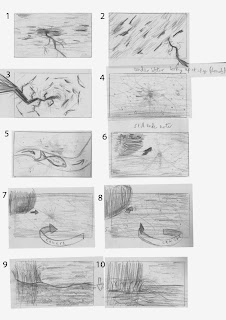
Starting with boards 1 to 3, my idea starts off by showing the sky with lightning flashing. This is just for the first two to three seconds. Although rather than just showing a few interesting camera angles, actually shake the camera and disorientate the viewer with quick blurry snippets. I thought that might go with the first sound played in the music.
4 to 10 are underwater. First a fish swims by, pauses and swims off camera. The black splodge in the distance is supposed to be the underside of the boat. The camera comes up close to the side of the boat and twists round to face the same direction as the boat. The camera is also rising and comes out of the water.
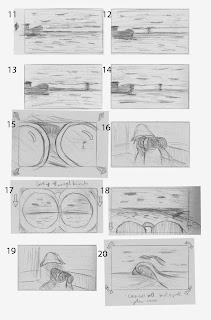
11 to 14 I hope is self explanatory. There is the sea, the sky, the boat and the horizon line dividing it in two. Three more sparks of lightning in the distance. This is timed to three sounds in the music. I was thinking of having it transition to 15 on the last flash. Notice in the reflection of the binoculars, you can see the the sea and sky with the horizon line in the same position.
16 shows the shadowy captain.
17 shows what he is seeing in the binoculars but they are also pulled down to see a wider angle of what's in front and then cuts back to the captain. He's seen a big wave coming his way.
In shot 20, the camera is following the wave, racing forwards, camera tilting from side to side a bit. Again this is timed to the music. 25 seconds in.
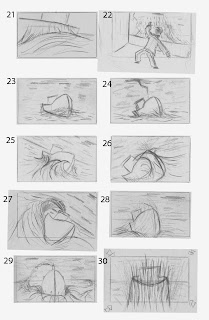
Bam... the wave hits the side of the boat in shot 21.
tssss… water comes up the side of the boat in shot 22.
23 to 28 show the boat getting battered by the waves. The camera is also tilting from side to side. In that sense, the viewer is also battling the waves.
29 to 32 show the camera panning around into the front of the boat and around to the other side, during another big splash. This is starting around 37 seconds in.
Now. There is a fish jumping in or over the boat. It may seem a bit randomly thrown in. No pun intended. But I pictured this fish in amongst the chaos, flapping about. Again this is one of those sounds I heard in the music. Its just a small background sound. The volume needs to be at a decent level to hear it. The fish can go if nobody likes it, or thinks it doesn't fit in.
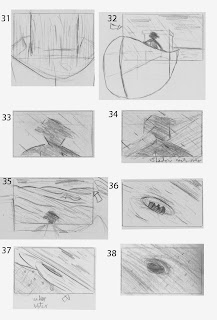
33 to 34 is continuing from the previous shot. The camera has just moved closer to the captain. A giant shadow is cast over him and the boat.
35 shows him looking at this giant wall of water.
36 he's in a whirl pool. Well something is sucking him into the sea. who knows what.
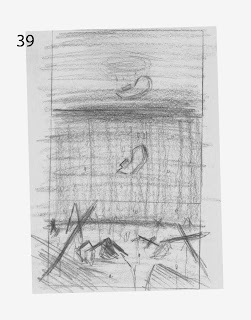
Then the camera plunges into the water. 38 shows the boat from under water.
Then the camera pans down, revealing many other ships and boats that have sunk.
Sorry thats a bit of a long read. I like to be certain that they're interpreted correctly.
It would probably be much clearer in an animatic. I'll try to get that done and uploaded asap.
I'm thinking of this as being a teaser trailer. So it's like a mini film for a bigger film which probably wont ever be made. I haven't yet decided on the title of the film, but whatever it is, it will be at the end of the animation not at the beggining. Like a real teaser trailer.
So there we have it. It is only the first storyboard and am open to suggestions. Of course if there's nothing wrong with it then it may as well be the final storyboard.
Whether there will be enough time to to Finnish the project, I don't know. One thing I do know is I haven't the foggiest idea how I'm going to make it. Stylisation (as mentioned previously) may be the way to simplify or alter some the technical challenges.

Starting with boards 1 to 3, my idea starts off by showing the sky with lightning flashing. This is just for the first two to three seconds. Although rather than just showing a few interesting camera angles, actually shake the camera and disorientate the viewer with quick blurry snippets. I thought that might go with the first sound played in the music.
4 to 10 are underwater. First a fish swims by, pauses and swims off camera. The black splodge in the distance is supposed to be the underside of the boat. The camera comes up close to the side of the boat and twists round to face the same direction as the boat. The camera is also rising and comes out of the water.

11 to 14 I hope is self explanatory. There is the sea, the sky, the boat and the horizon line dividing it in two. Three more sparks of lightning in the distance. This is timed to three sounds in the music. I was thinking of having it transition to 15 on the last flash. Notice in the reflection of the binoculars, you can see the the sea and sky with the horizon line in the same position.
16 shows the shadowy captain.
17 shows what he is seeing in the binoculars but they are also pulled down to see a wider angle of what's in front and then cuts back to the captain. He's seen a big wave coming his way.
In shot 20, the camera is following the wave, racing forwards, camera tilting from side to side a bit. Again this is timed to the music. 25 seconds in.

Bam... the wave hits the side of the boat in shot 21.
tssss… water comes up the side of the boat in shot 22.
23 to 28 show the boat getting battered by the waves. The camera is also tilting from side to side. In that sense, the viewer is also battling the waves.
29 to 32 show the camera panning around into the front of the boat and around to the other side, during another big splash. This is starting around 37 seconds in.
Now. There is a fish jumping in or over the boat. It may seem a bit randomly thrown in. No pun intended. But I pictured this fish in amongst the chaos, flapping about. Again this is one of those sounds I heard in the music. Its just a small background sound. The volume needs to be at a decent level to hear it. The fish can go if nobody likes it, or thinks it doesn't fit in.

33 to 34 is continuing from the previous shot. The camera has just moved closer to the captain. A giant shadow is cast over him and the boat.
35 shows him looking at this giant wall of water.
36 he's in a whirl pool. Well something is sucking him into the sea. who knows what.

Then the camera plunges into the water. 38 shows the boat from under water.
Then the camera pans down, revealing many other ships and boats that have sunk.
Sorry thats a bit of a long read. I like to be certain that they're interpreted correctly.
It would probably be much clearer in an animatic. I'll try to get that done and uploaded asap.
I'm thinking of this as being a teaser trailer. So it's like a mini film for a bigger film which probably wont ever be made. I haven't yet decided on the title of the film, but whatever it is, it will be at the end of the animation not at the beggining. Like a real teaser trailer.
So there we have it. It is only the first storyboard and am open to suggestions. Of course if there's nothing wrong with it then it may as well be the final storyboard.
Whether there will be enough time to to Finnish the project, I don't know. One thing I do know is I haven't the foggiest idea how I'm going to make it. Stylisation (as mentioned previously) may be the way to simplify or alter some the technical challenges.
Sunday, 8 August 2010
An initial Painting
Well Iv'e been able to borrow my brothers Wacom tablet for the next few weeks. So I decided I'd actually produce a digital painting now. You've seen the reference images, but I wanted to do an initial painting just so you can get an accurate feel for what I want to create. I also wanted to test out photoshop CS5's new paint brush features and they are amazing.
This was created straight from photoshop. No sketches or guides. I didn't even have any reference images in front of me. Just painting off the top of my head.
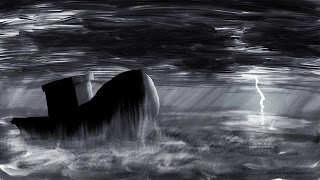
The boat is kept simple, but I actually like it like that. There aren't even any windows. Its a slightly 3D silhouette of a boat. With minimal shading. The waves created by the growing storm are the main focus of this animation.
Just looking at the picture now, I'm thinking maybe that the clouds end a bit to suddenly.
I'd like to hear what people think of it. Both from an idea and a technical point of view.
This was created straight from photoshop. No sketches or guides. I didn't even have any reference images in front of me. Just painting off the top of my head.

The boat is kept simple, but I actually like it like that. There aren't even any windows. Its a slightly 3D silhouette of a boat. With minimal shading. The waves created by the growing storm are the main focus of this animation.
Just looking at the picture now, I'm thinking maybe that the clouds end a bit to suddenly.
I'd like to hear what people think of it. Both from an idea and a technical point of view.
Friday, 6 August 2010
Pre Production begins
Ok. so I've started off with the basics. I've collected some images of stormy seas as reference.
I think I will be limiting the colour palette to these sorts of greens and blues.

I also want to use strong silhouettes of boats in my scene.
I'm thinking that it may be too much to model lots of different ships and boats, so instead, (assuming the camera doesn't move too much), just use 2d black and white image planes in the distance.

A good image of a boat lost in the fog.

Just another painting of a ship in rough weather.

More rough seas.

Nice slanted composition.

Not quite stormy but the clouds look good.
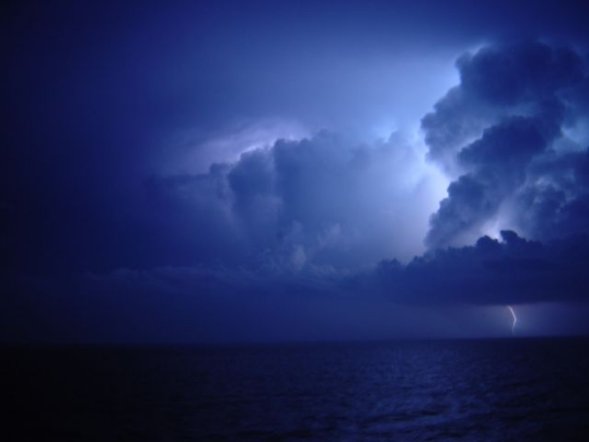
Crushing waves against the rocks.

This is actually the closest to what I originally pictured. Although not necessarily what I'm going for.

Could be a nice ending shot maybe.

Just a side note. I think I will be sketching out some rough compositions. I really want to create a digital painting as well. In the meantime I'll focus more on storyboarding my ideas.
I think I will be limiting the colour palette to these sorts of greens and blues.
I also want to use strong silhouettes of boats in my scene.
I'm thinking that it may be too much to model lots of different ships and boats, so instead, (assuming the camera doesn't move too much), just use 2d black and white image planes in the distance.
A good image of a boat lost in the fog.
Just another painting of a ship in rough weather.
More rough seas.
Nice slanted composition.
Not quite stormy but the clouds look good.
Crushing waves against the rocks.
This is actually the closest to what I originally pictured. Although not necessarily what I'm going for.

Could be a nice ending shot maybe.
Just a side note. I think I will be sketching out some rough compositions. I really want to create a digital painting as well. In the meantime I'll focus more on storyboarding my ideas.
Summer Project Ideas
Ok. hello everyone. I'm back. Not that I really went far, I just haven't been blogging much.
Anyway I thought I'd start this post with my ideas so far, regarding my soundscape. Actually I think it would be better to say that I got soundscape 14 before I go any further. And here it is, if you want to listen.
Now I thought long and hard on an idea based on the soundscape. I knew immediately that it was going to be an environment or more specifically a scene, but I couldn't think of what. For a long time I was struggling to get this sci-fi scene out of my head.It was almost as if I was trying to it fit with the music, rather than it coming from the music. It was clouding my mind. But after looking at a box of rechargeable batteries, an idea came to me. (I'll explain that in a second)
Anyway, my Idea is a boat (not sure what kind yet) lost at sea, sailing right into a storm. Waves crashing, lightning, thundering and rain pouring etc, gradually getting worse. Then right near the end the captain sees through the fog, a graveyard of ships and oh dear. It's not looking good for the the captain and his crew now. And that's basically it.
And your probably wondering how I got that from a box of rechargeable batteries… well… there was a picture of some waves crashing against some rocks on the front of the box. Something just clicked together like a lego brick. I found that piece out of a million pieces, and I think it fits together with the music.
So thats my idea. Numerous ideas went through my head to come up with this one. I only hope that everyone else thinks its a good idea, or at least a good starting point. Any suggestions or opinions are welcome.
Just another note. I have't yet decided what the final outcome would be. I could go through the usual things like sketches and digital painting, up to a cg render. But an animation would be more what I would like to do. Just depends whether thats too ambitious for the amount of time I have left.
Anyway I thought I'd start this post with my ideas so far, regarding my soundscape. Actually I think it would be better to say that I got soundscape 14 before I go any further. And here it is, if you want to listen.
Now I thought long and hard on an idea based on the soundscape. I knew immediately that it was going to be an environment or more specifically a scene, but I couldn't think of what. For a long time I was struggling to get this sci-fi scene out of my head.It was almost as if I was trying to it fit with the music, rather than it coming from the music. It was clouding my mind. But after looking at a box of rechargeable batteries, an idea came to me. (I'll explain that in a second)
Anyway, my Idea is a boat (not sure what kind yet) lost at sea, sailing right into a storm. Waves crashing, lightning, thundering and rain pouring etc, gradually getting worse. Then right near the end the captain sees through the fog, a graveyard of ships and oh dear. It's not looking good for the the captain and his crew now. And that's basically it.
And your probably wondering how I got that from a box of rechargeable batteries… well… there was a picture of some waves crashing against some rocks on the front of the box. Something just clicked together like a lego brick. I found that piece out of a million pieces, and I think it fits together with the music.
So thats my idea. Numerous ideas went through my head to come up with this one. I only hope that everyone else thinks its a good idea, or at least a good starting point. Any suggestions or opinions are welcome.
Just another note. I have't yet decided what the final outcome would be. I could go through the usual things like sketches and digital painting, up to a cg render. But an animation would be more what I would like to do. Just depends whether thats too ambitious for the amount of time I have left.
Subscribe to:
Posts (Atom)